Let's Make an EBook


Some of our amazing year 1 and 2 GEMS have visited the Exploration Station lately.  


They used their searching powers to take photos for a scavenger hunt around the station.  We used these photos to start creating our very own electronic books in Book Creator.  This was our first attempt at learning how to use this tool. 

We had to think carefully about how to take a great photo. 

Mrs Lee helped us out with some tips - 
Duck arms
Breathe In 
and Snap
This helped us to take clear photos and to balance while we were taking them.  

We also had to think about what was in our photo and started looking at how to frame a photo so that we can be clear about what is in it.


Can we Breakout?


Part of the learning we did in the Exploration Station with our lovely year 3 students was to try a digital Breakout EDU game.  We worked in groups to see if we could figure out the clues and unlock the locks to 'BreakOut'  

We had to think carefully about what we needed to do - just like a computer, we had to use a specific sequence or order as well as finding the patterns in each of the clues that would help us to solve the problem.  


Some of us were so excited about breaking out we wanted to continue our learning at home.  We can do this using our Google Classroom and finding the link to the Breakout Assignment.  

Teachers, you can find out more about Breakout EDU here. 

We have Questions... and Answers!


The Year 2 and 3 GEMS have enjoyed participating in a special classroom session run by AnyQuestions.   


Any Questions is a government-run website here in New Zealand staffed by amazing librarians.  Teachers can book a time with them to help introduce their students to the Any Questions platform and to kickstart inquiry and safe search techniques.  Learners can also visit the site from Monday to Friday between 1pm and 6pm to help with any questions they have.  What a great FREE resource!

Before we started the session we had a discussion about what librarians do.  Our GEMS were interested to find out that librarians are information experts and not only do they know a lot about books in the library but they're also really good at helping you to find information online. 

When we joined our classroom session we had to agree to an acceptable use policy - we read through this together so we all understood what we were agreeing to.  It's really important when you're asked to agree to terms and conditions and/or acceptable use policies that you read and understand them first.   We were happy to agree to this policy because we were prepared to be respectful when we were chatting and made sure we weren't going to waste the librarians time by having our questions already prepared. 

During our sessions, we connected with the lovely Amy who helped our learners to answer some of the questions they had recently brainstormed in their regular classrooms.  Our inquiry topics at the moment are looking at Planet Earth and Beyond.  Year 2 GEMS have been focusing on space and Year 3 GEMS have been focusing on the ocean.    You can see our chat transcripts below. 

Room 11
Room 12
Room 13
Room 21

Amy helped us to find answers to our questions by suggesting some great websites we could visit, helping us to think of keywords when we're searching and reminding us about what websites we can trust when we're searching.  We know that when we choose to search online we should also make sure we're working with a trusted adult and checking with them before we go to sites we haven't investigated before or that are new to us.

We're looking forward to using our resources in our classrooms and we'll be sure to visit Any Questions again if we need some more help answering our questions.  We think other learners in New Zealand should go and visit them too it's a great resource.  Here's the link https://anyquestions.govt.nz/


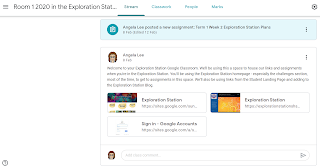
A Digital Classroom

Teacher View of Google Classrooms

Inside a Google Classroom

We're working with Google Classroom in the Exploration Station, yepee!

Our year 3-6 learners have now got access to their own Exploration Station classroom.  Learners have access to these classrooms when they're using their school accounts.

We started off getting into our Google Classrooms (we have one space for each class) and creating the title for our planning slide deck that we use all year in the Exploration Station.  We've also added a few copyright free images and started planning our searches. 

Google classroom is new for many of us so we're still learning all about the different features and ways we can use it.  We were very lucky to have a few TeXperts from last year in our year 4, 5 and 6 classrooms to help us figure out how Google Classroom works. 

At the moment most of us can find an assignment, hand it in and some of us have also learnt how to attach a file to an assignment.  We were able to experiment with the rubrics and private comments with our teacher too.

We use links from the Exploration Station site to help us get to the right spot in Google Classroom. It's been great at challenging us to take charge of our learning as all the instructions for the assignments are in Google Classroom.   Here are some of our learners completing their SHINE Online - Interesting and Alert assignments - using their knowledge about how to spot a fake to get through the Be Internet Awesome and Google phishing quiz.